
Phocus Basic Photography Workshop from Phocus Academy on Vimeo.
Minimal classroom time, maximum shooting time.
7 sessions, 2 hours each, S$480 (see discount, course outline or sign up now)
Learn basic photography with the most hands-on photography class in Singapore.
Instead of getting you to memorise scary terms like aperture, shutter speed, depth of field, we prefer to bring you out to the field and show you what they really mean—and what you can do with them.
To help you get acquainted with your camera quickly, you’ll spend a total of 10 out of 14 hours of your course taking photographs (and editing them) in various locations in central Singapore rather than sitting in the classroom.
By the end of this 7‑session workshop, you would have gone through four guided field trips, including a night outing covering low-light and flash photography. You’ll be comfortable handling your camera and understand technical concepts from the different shooting modes to aperture and shutter speed.
You’ll also be able to apply composition techniques from finding effective backgrounds to rule of the thirds, know what makes a good photo and how to improve a bad one.
Through our field trips and assignments, you’ll also become more confident approaching people on the streets for portraits. You’ll also learn to work on your digital photos in Adobe Lightroom, apply basic adjustments and correction and output them print at minilabs such as our partner lab, Triple D.
Most importantly, you’d have lots of fun! We keep our class small (8 persons max*) so you can be sure you’ll get individual attention from our instructors. Indoor lessons take place at our partner studio located in central Singapore near Clarke Quay and City Hall.
Recommended and suitable for: Beginners who want a strong foundation in photography. We also offer a shorter basic photography workshop that is completed in 1 week with fewer weekend classes.
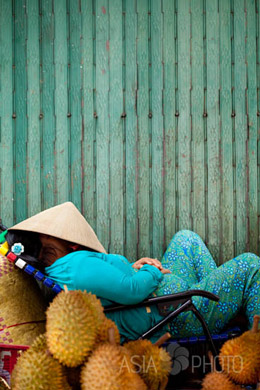
Ho Chi Minh, Vietnam, 2009. Commissioned by AsiaPhoto
*We may cater up to 2 additional places per lesson for students who have made special prior arrangements with us during registration to make up for a missed lesson.
Most Hands-on Basic Photography Course
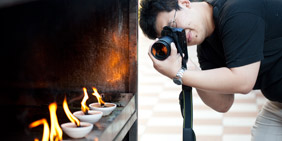
Theory is nice, but we realise most people just want to take good photos—and nothing beats going out there to shoot. Many students choose our workshops because they don’t want to learn photography sitting in some classroom. We keep theory to a minimum, preferring instead to bring you out to do some real photography.
Get the Most Attention With the Least Bucks

If there’s one thing that we’re extremely particular about, it’s making sure each and every of our student gets the attention needed to learn effectively. That’s why our Practical Photography class is limited to just eight people*. You might find similar-looking workshops elsewhere at $10–20 cheaper, but you won’t find one that offers you as much attention as you can get from ours.
Expose Yourself to Different Kinds of Photography
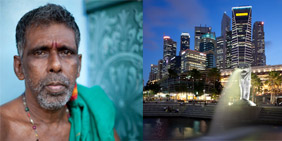
Portraits, streets, landscapes, nightscapes, flash, flora, architecture, macro and close-up—these are the kinds of photography that you’ll get to shoot in our Practical Photography class. By the end of the workshop, you’ll be more than well-equipped to tackle most genres of photography and discover the ones you like most.
Course Requirements
Participants must bring their own camera (DSLR or compact with manual exposure modes). A tripod is required for some guided field trips, and a laptop for lesson 7.
 Tripod recommended for lesson 4 and 6. Tripods of varying built quality are available for rent from our partner Camera Rental from $10–20 a day. Students enjoy a discount on equipment rental.
 Laptop with Lightroom CC installed recommended for lesson 7
Course Schedule
In view of the prevailing COVID 19 situation, class sizes would be kept to a maximum of 4 participants
August/September 2022 Class (Saturdays and SUndays)
From 27 August to 11 September 2022
- 27 August 2022, 12:30—2:30pm
- 27 August 2022, 4:00—6:00pm
- 28 August 2022, 7:30—9:30am
- 03 September 2022, 6:00—8:00pm
- 03 September 2022, 1:00—3:00pm
- 10 September 2022, 7:30—9:30am
- 11 September 2022, 1:00—3:00pm
July 2022 Class (Weekends)
From 02 July to 17 July 2022
- 02 July 2022, 12:30—2:30pm
- 02 July 2022, 4:00—6:00pm
- 03 July 2022, 7:30—9:30am
- 09 July 2022, 6:00—8:00pm
- 09 July 2022, 1:00—3:00pm
- 16 July 2022, 7:30—9:30am
- 17 july 2022, 1:00—3:00pm
Wet Weather Postponement
In the event of wet weather conditions, the instructor may give an one hour prior notice to postpone the guided field trip. For Saturday classes, the field trip will be postponed to the next day on Sunday at the same timing; for Sunday classes, the field trip will be postponed to the next Saturday at the same timing. For School Holidays classes, the field trip will be postponed to the next day at the same timing. However, special wet weather arrangement may apply if it is listed under Course Schedule.
Promotions & Discounts
Early Bird Promotion — $10 off
Sign up and make payment at least one month before the commencement date to enjoy $10 off your course fee.
Bring-a-friend Promotion — $10 off
Get $10 off your course fees when you sign up with your friends and make payment together.
Sign up for Practical Photography (Basic Photography Course)
Course Outline
| Lesson details | Topics covered |
|---|---|
| Lesson 1 Introduction Location: the Hive Lavender, 1 Kallang Junction |
Technical Composition |
| Lesson 2 Guided Field Trip I Location: Thian Hock Kheng Temple (Telok Ayer Street) |
Photo Shoot
Learning Objectives |
| Lesson 3 Guided Field Trip II Location: Singapore Botanical Gardens |
Photo Shoot
Learning Objectives |
| Lesson 4 Introduction Location: the Hive Lavender, 1 Kallang Junction |
Technical Composition |
| Lesson 5 Guided Field Trip III Location: Merlion Park |
Photo Shoot
Learning Objectives |
| Lesson 6 Guided Field Trip IV Location: Little India |
Photo Shoot
Learning Objectives |
| Lesson 7 Digital Workflow and Imaging Location: the Hive Lavender, 1 Kallang Junction |
The Digital Workflow
Learning Objectives |
Testimonials
Don’t just take our word for it—hear what some of our past students have to say about the workshop.
You have made something so complex and technical so simple and easy to understand. You have certainly made photography a new love in my life.I am going to miss these weekly classes and look forward to photo-shoot sessions with you and others.
— Kenneth,
Practical Photography
The outdoor sessions were particularly useful in improving my photographic skills and the instructors were very well prepared. Overall, I felt that I learnt a lot from this short course and I would urge beginners to join it too!
— Jasmine Kwok,
Practical Photography for Busy People
After this course I now realize that taking photos is not just a matter of point and shoot.…… I feel like my interest in photography has been re-awakened. Now, I have a better appreciation of the art and the limitations of the technology.… I used to be a person with a camera, now I feel like I am a student of photography with a camera.
— Slawek,
Practical Photography For Busy People
A very good course to introduce someone into photography. Classroom size is optimal. Lots of opportunities to photograph under different conditions (low light, landscape, potraiture etc). Instructor was well informed and available to give on-the-spot advise. Greatly benefitted from this course. Looking forward to more workshops with Phocus.
— Alywin Chan,
Practical Photography